Configuring Export: PGAS Data XML Commands
Note: This command is provided as an optional feature. For this command to function, additional file requirements must be met.
If installed, use the Export: PGAS Data XML command to export raw data records for a defined time range from FMS to a specified directory location in a PGAS XML format (conforms to PGAS version 16). Data that is not from a raw data source, e.g. has been imported into FMS via .csv files (categorized as a "User file" source), is not included in the export.
When the Export: PGAS Data XML command is executed, data is resolved for each eligible device via hard coded data item mappings in the application. To achieve this, a command definition file (CDF) must also be present, so that the FMS can export the raw data records specified. The file is not editable at this time.
See FMS Commands and PGAS Data XML for more information about using this command via CygNet Explorer (MSS).
See Scheduling FMS Command Tasks in the MSS for more information about scheduling commands.
See FMS ActiveX Controls and CxHmiFms for more information about using commands via FMS ActiveX controls on CygNet Studio or CygNet Vision screens.
See CxFms for more information about scripting commands.
Command Requirements
To enable the command to export raw data to PGAS XML files, and see the command listed in command management options, the following elements must be present.
- PGAS Export CDF — CygNet Measurement provides a command definition file (CDF) that must be made available on your system to enable the raw data to be exported from FMS to PGAS XML files. The data item mappings necessary to execute the export command to the corresponding PGAS file format are hard-coded in the system, and are not editable at this time. See Utilizing the Command Definition File for more information about data item mappings.
The specific CDF file (ExportPgasXml.cdf) must be included in the CygNet\Services\FMS\CommandDefs folder on your host server, as follows.
- On your host server, in the CygNet\Services\FMS\CommandDefs\ExportSamples folder, find the SampleExportPgasXml.cdf (command definition) file and copy it up one level to the CygNet\Services\FMS\CommandDefs folder. Important: Do not alter or add to the sample file contents.
- Remove the word "Sample" from the file name (for the new copy of the file). The file must be named ExportPgasXml.cdf so that the file will be recognized by the FMS.
- Restart the FMS.
Note: Refer to Quorum PGAS documentation and/or contact your PGAS representative for the most current information about PGAS versions, and specific PGAS configuration details.
Configuring an Export: PGAS Data XML Command
If desired (optional), familiarize yourself with item mappings used by the system to export the raw data. These items cannot currently be viewed in the file, and the file content must not be altered.
Use the following procedure to configure PGAS Data XML exports.
To Configure an Export: PGAS Data XML Command
- Open the Command menu in FMS Explorer.
- Click Manage to access the FMS Command Definitions dialog box and then click Add to access the Create New FMS Command Definition dialog box.
|
Create New FMS Command Definition |
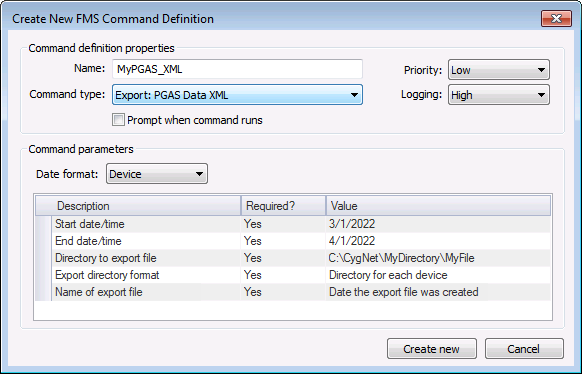
- Define the command definition properties.
- Type a Name for the command into the text box. Maximum character count is 50.
- Select the Command type from the drop-down menu.
- Select a processing Priority from the drop-down menu.
- Select a Logging level from the drop-down menu, to determine the level of logging details reported when viewing command logs. Options include Low, Medium, and High. See Viewing Command Logs for more information.
- Click to select/clear the check box to Prompt when command runs.
- Define the command parameters. The parameters for the Export: PGAS Data XML command are described in the Command parameters box, which includes the Description, a Required indicator, and a configurable Value field. Set the value for each required and each desired optional parameter, as indicated in its Value field.
- Click Create New. The new command will appear in the list of FMS Command Definitions.
Command Definition Properties
The following command definition properties apply to Export: PGAS Data XML commands.
| Property | Description |
|---|---|
|
Name |
Type in a Name for the new command. |
|
Command type |
Select the desired Command type from the drop-down menu. See FMS Commands for more information about available command types. |
|
Priority |
Select a processing queue Priority for the command from the drop-down menu. Options from least to greatest priority are as follows.
Default value is Low level processing queue priority. |
|
Logging |
Select a Logging level for the command results from the drop-down menu. Options are as follows.
Default value is Low level logging when scheduling a command in the MSS. Default value is High level logging when creating or running an ad-hoc command in FMS Explorer. |
|
Prompt when command runs |
Click to select/clear the check box to Prompt when command runs. Selecting this option means you will receive a prompt asking if you want to modify the parameters before the command is executed. |

Command Parameters
The following command parameters apply to Export: PGAS Data XML commands when creating or editing commands via FMS Explorer.
| Description | Value |
|---|---|
|
Date format |
Select the desired time format for data selection, from the drop-down menu. Options are as follows.
Default value is Device time. |
|
Start date/time |
Select the beginning date and time of the range for which to export device records. Click ... to access the Select Start Date/time dialog box. See Selecting Date and Time for more information. See Note below this table. This parameter is required. |
|
End date/time |
Select the ending date and time of the range for which to export device records. Click ... to access the Select End Date/time dialog box. See Selecting Date and Time for more information. See Note below this table. This parameter is required. |
|
Directory to export file |
Enter the directory location to which the file will be exported. Type the directory location for the file into the text box or click ... to access the Browse For Folder dialog box, browse to the directory location, and then click OK. This parameter is required. |
|
Export directory format |
Select a file directory format for the XML export file, from the options in the drop-down menu. Options are as follows.
This parameter is required. |
|
Name of export file |
Select a file name format for the XML export file, from the options in the drop-down menu. Options are as follows.
This parameter is required. |
Note: When using relative (rather than absolute) date/time, if both the start and end date/time have hour, minute, and second values of 00, or if both are set to midnight, an additional day will be added to the date at the end of the range. This occurs because the service assumes the start of the day for the starting date/time and the end of the day for the ending date/time in these circumstances. Therefore requesting a time range from T to T will yield one day of data, and from T-1 to T will yield two days of data. If only one day of data is desired when using relative date/time, the start and end date/times must therefore be the same. If any of the start or end date/time hour, minute, or second values are specified as a value other than zero (or midnight) however, the range will be used as specified.
Editing or Deleting an Export: PGAS Data XML Command
See Managing Node Commands for information about editing or deleting this command.
Running an Export: PGAS Data XML Command
See Running Node Commands for information about running this command.
Using the Command Definition File
When the command is run, raw data is exported to an XML file format consumable by PGAS. CygNet Measurement uses an FMS-to-PGAS internal mapping to produce the XML file. Data is exported as follows.
- If using a date-based export file name format and the selected file name already exists in the specified directory (as a valid PGAS XML file), any new data exported by the command will be exported to a new uniquely named file. The new file name is created by using the existing file name specified and appending a sequential two-digit index number to it, up to a maximum index of 99, after which point the export will no longer succeed.
- If using the Node name export file name format and the selected file name already exists in the specified directory, the export will fail.
Use the following procedure to make the command definition file (CDF) available to the FMS service, before executing the Export: PGAS Data XML command.
- On your host server, in the CygNet\Services\FMS\CommandDefs\ExportSamples folder, find the SampleExportPgasXml.cdf (command definition) file and copy it up one level to the CygNet\Services\FMS\CommandDefs folder. Remove the word "Sample" from the file name of the new copy of the file, so that the file will be recognized by the FMS. The file content must remain as-is; do not edit or add to the file.
- Save the ExportPgasXml.cdf file.
- Restart the FMS.
Note: Problems that arise while processing a command definition file are logged to the Services > FMS log file.
Mapping of FMS Data Items to PGAS Attributes
CygNet Measurement automatically maps FMS data items to their related Alarm, Characteristics, Event, and Volume PGAS XML attributes for export. To identify equivalent data items for informational purposes, the following tables indicate item mappings used.
PGAS Alarms Attributes
| FMS Alarm Data Item | PGAS XML Attribute - Alarm |
|---|---|
| eFMS_EVENT_TYPE_DEVICE_ID | METER_ID This column is required |
| eFMS_EVENT_TYPE_DATE | ALARM_DATE This column is required |
| Text description of event | DESCRIPTION |
| Value that caused the alarm | ALARM_VALUE |
| Level of the alarm | ALARM_LEVEL |
PGAS Characteristics Attributes
| FMS Configuration Data Item | PGAS XML Attribute - Characteristics |
|---|---|
| CFmsDeviceRec.strName | METER_ID |
| ConfigLogRec.ddtDatetime | COLLECTION_DATE |
| eFMS_CFG_METER_ID | METER_NAME |
| eFMS_CFG_METER_TYPE | METER_TYPE |
| eFMS_CFG_BASE_PRESSURE | PRESSURE_BASE |
| eFMS_CFG_BASE_TEMPERATURE | TEMPERATURE_BASE |
| eFMS_CFG_METER_TUBE_INSIDE_DIAMETER | TUBE_DIAMETER |
| eFMS_CFG_METER_TUBE_MATERIAL | TUBE_MATERIAL |
| eFMS_CFG_METER_TUBE_REF_TEMP | TUBE_REF_TEMP |
| eFMS_CFG_SP_TAP_LOCATION | TAP_LOCATION |
| eFMS_CFG_DP_TAPS_TYPE | TAP_TYPE |
| eFMS_CFG_ORIFICE_PLATE_BORE_SIZE | ORIFICE_DIAMETER |
| eFMS_CFG_ORIFICE_PLATE_MATERIAL | ORIFICE_MATERIAL |
| eFMS_CFG_ORIFICE_PLATE_REF_TEMP | ORIFICE_REF_TEMP |
| eFMS_CFG_DP_TRANSDUCER_RANGE_HIGH | DP_HIGH_RANGE |
| eFMS_CFG_SP_TRANSDUCER_RANGE_HIGH | SP_HIGH_RANGE |
| eFMS_CFG_SP_SENSOR_TYPE | SP_TYPE |
| eFMS_CFG_TEMP_TRANSDUCER_RANGE_LOW | TEMP_LOW_RANGE |
| eFMS_CFG_TEMP_TRANSDUCER_RANGE_HIGH | TEMP_HIGH_RANGE |
| eFMS_CFG_CALC_METHOD_FPV | COMPRESSIBILITY_METHOD |
| eFMS_CFG_INTEGRAL_VALUE_VARIABLES | EXTN_IV_METHOD |
| eFMS_CFG_METER_FACTOR | METER_FACTOR |
| eFMS_CFG_GAS_K_FACTOR_VOLUME | K_FACTOR |
| eFMS_CFG_CONTRACT_HOUR | CONTRACT_HOUR |
| eFMS_CFG_ATMOSPHERIC_PRESSURE | ATM_PRESSURE |
| eFMS_CFG_PIPE_COEFFICIENT_THERMAL_EXPANSION | TUBE_THERMAL_EXP_COEFFICIENT |
| eFMS_CFG_ORIFICE_COEFFICIENT_THERMAL_EXPANSION | PLATE_THERMAL_EXP_COEFFICIENT |
| eFMS_CFG_METER_TYPE | DIFF_METER_TYPE |
| eFMS_CFG_METER_TUBE_MATERIAL | MATERIAL |
| eFMS_CFG_METER_TUBE_REF_TEMP | REF_TEMP |
| eFMS_CFG_DISCHARGE_COEFFICIENT | DISCHARGE_COEF |
| eFMS_CFG_DP_CALIBRATE_HIGH | DP_HIGH_SPAN |
| eFMS_CFG_DP_CALIBRATE_LOW | DP_LOW_SPAN |
| eFMS_CFG_SP_CALIBRATE_HIGH | SP_HIGH_SPAN |
| eFMS_CFG_SP_CALIBRATE_LOW | SP_LOW_SPAN |
| eFMS_CFG_TEMP_CALIBRATE_HIGH | TEMP_HIGH_SPAN |
| eFMS_CFG_TEMP_CALIBRATE_LOW | TEMP_LOW_SPAN |
| eFMS_CFG_CALC_METHOD_DISCHARGE_COEFFICIENT | DISCHARGE_COEF_METHOD |
| eFMS_CFG_CALC_METHOD_GAS_EXPANSION_FACTOR | GAS_EXPANSION_FACTOR_METHOD |
| eFMS_CFG_SAMPLE_RATE | SAMPLE_RATE |
| eFMS_CFG_BASE_COMPRESSIBILITY_OF_AIR | BASE_COMPRESS_AIR |
| eFMS_CFG_VISCOSITY | ABS_VISCOSITY |
| eFMS_CFG_DP_ALARM_HIGH | ALARM_DP_HIGH |
| eFMS_CFG_DP_ALARM_LOW | ALARM_DP_LOW |
| eFMS_CFG_SP_ALARM_HIGH | ALARM_SP_HIGH |
| eFMS_CFG_SP_ALARM_LOW | ALARM_SP_LOW |
| eFMS_CFG_TEMP_ALARM_HIGH | ALARM_TEMP_HIGH |
| eFMS_CFG_TEMP_ALARM_LOW | ALARM_TEMP_LOW |
| eFMS_CFG_FIXED_TEMP | DEFAULT_FIXED_TEMP |
| eFMS_CFG_ELEVATION | ELEVATION |
| eFMS_CFG_LATITUDE | LATITUDE |
| eFMS_CFG_LONGITUDE | LONGITUDE |
PGAS Event Attributes
| FMS Data Item | PGAS XML Attribute - Event |
|---|---|
| NodeName | METER_ID |
| Date of event
Date/Time entry value from Raw Data control |
EVENT_DATE |
| PGAS XML file column name
See table of PGAS Event Tag Names below |
TAG_NAME |
| Text description of event
'Category' + 'Type' column values from Raw Data control |
DESCRIPTION |
| Comment regarding event
'Additional Info' column value from Raw Data control |
COMMENT |
| New record value
Value |
NEW_VALUE |
| Old record value
Value |
OLD_VALUE |
PGAS Event Tag Names
| FMS Data Item | PGAS TAG_NAME |
|---|---|
| OrificePlateBoreSize | ORIFICE_SIZE |
| MeterTubeInsideDiameter | TUBE_DIAMETER |
| BaseTemperature | TEMP_BASE |
| BasePressure | CONTRACT_PRES_BASE |
| AtmosphericPressure | SITE_ATMOS_PRES |
| OrificePlateMaterial | PLATE_MATERIAL |
| MeterTubeMaterial | TUBE_MATERIAL |
| DpTapsType | DIFF_TAP_TYPE |
| SpTapLocation | STAT_TAP_LOCA |
| DpTransducerRangeHigh | DIFF_HI_RANGE |
| SpTransducerRangeHigh | STATIC_HI_RANGE |
| TempTransducerRangeLow | TEMP_LO_RANGE |
| TempTransducerRangeHigh | TEMP_HI_RANGE |
| MeterId | METER_NAME |
| DeviceType | METER_TYPE |
| Elevation | LOC_ELEVATION |
| Latitude | LOC_LATITUDE |
| Longitude | LOC_LONGITUDE |
| SpType | SP_TYPE |
| IntegralValueVariables | EXTN_IV_METHOD Variables included in IV Possible values are: FLOW_ANDT FLOW_ONLY STANDARD |
| GasExpansionFactorCalc | GAS_EXPANSION_FACTOR_METHOD |
| DischargeCoefficientCalc | DISCHARGE_COEF_METHOD |
| FpvCalc | COMPRESSIBILITY_METHOD |
| Methane | METHANE |
| Ethane | ETHANE |
| Propane | PROPANE |
| Isobutane | IBUTANE |
| n-Butane | NBUTANE |
| Isopentane | IPENTANE |
| n-Pentane | NPENTANE |
| Neopentane | NEO_PENTANE |
| n-Hexane | HEXANE |
| n-Heptane | HEPTANE |
| n-Octane | OCTANE |
| n-Nonane | NONANE |
| n-Decane | DECANE |
| Nitrogen | NITROGEN |
| CarbonDioxide | CARBON_DIOXIDE |
| Water | H2O |
| HydrogenSulfide | H2S |
| Hydrogen | HYDROGEN |
| CarbonMonoxide | CARBON_MONOXIDE |
| Oxygen | OXYGEN |
| Helium | HELIUM |
| Argon | ARGON |
| DewPoint | Dew Point |
| RelativeDensity | GRAVITY |
| Viscosity | VISCOSITY |
| MeterTubeRefTemp | REF_TEMP |
| OrificePlateRefTemp | ORIFICE_REF_TEMP |
| NodeContractHour | CONTRACT_HOUR |
| KFactorVolume | K_FACTOR |
| Device specific event information | Device Events: Device Specific |
PGAS Volume Attributes
Items listed may be applicable for volume (V), quality (Q), or either (V, Q).
| FMS Data Item | V/Q | PGAS XML Attribute - Volume |
|---|---|---|
| CFmsDeviceRec.strName | V,Q | METER_ID |
| BeginDateTime | V | START_DATE |
| EndDateTime | V | END_DATE |
| eFMS_PV_FLOW_TIME FlowTime |
V | FLOW_TIME_MINS |
| eFMS_PV_FLOW_VOLUME
Volume |
V | VOLUME |
| eFMS_PV_ACCUM_ENERGY Energy |
V | ENERGY |
| eFMS_PV_IV IV |
V | FLOW_EXTENSION |
| eFMS_PV_DIFF_PRESSURE Dp |
V | DIFF_PRESS |
| eFMS_PV_LINE_PRESSURE Sp |
V | STATIC_PRESS |
| eFMS_PV_FLOW_TEMP Temp |
V | TEMPERATURE |
| eFMS_PV_UNCORRECTED_VOLUME UncorrectedVolume |
V | UNCORR_VOLUME |
| eFMS_PV_PULSES Pulses |
V | FREQUENCY |
| eFMS_PV_IMV IMV |
V | CPRIME |
| eFMS_PV_FLOW_RATE | V | AVG_FLOW_RATE |
| PQ datetime stamp
'Begin Normalized Date/Time' column value from Raw Data control |
Q | SAMPLE_ON_DATE |
| PQ datetime stamp
'Begin Normalized Date/Time' column value from Raw Data control |
Q | EFFECTIVE_START_DATE |
| eFMS_PV_NITROGEN Nitrogen |
Q | NITROGEN |
| eFMS_PV_CARBON_DIOXIDE CarbonDioxide |
Q | CARBON_DIOXIDE |
| eFMS_PV_RELATIVE_DENSITY RelativeDensity |
Q | REAL_GRAVITY |
| eFMS_PV_HEATING_VALUE_VOLUME HeatingValueVolume |
Q | DRY_HEATING_VALUE |
| eFMS_PV_METHANE Methane |
Q | METHANE |
| eFMS_PV_ETHANE Ethane |
Q | ETHANE |
| eFMS_PV_PROPANE Propane |
Q | PROPANE |
| eFMS_PV_WATER Water |
Q | H2O |
| eFMS_PV_HYDROGEN_SULFIDE HydrogenSulfide |
Q | H2S |
| eFMS_PV_HYDROGEN Hydrogen |
Q | HYDROGEN |
| eFMS_PV_CARBON_MONOXIDE CarbonMonoxide |
Q | CARBON_MONOXIDE |
| eFMS_PV_OXYGEN Oxygen |
Q | OXYGEN |
| eFMS_PV_ISOBUTANE Isobutane |
Q | IBUTANE |
| eFMS_PV_N_BUTANE n-Butane |
Q | NBUTANE |
| eFMS_PV_ISOPENTANE Isopentane |
Q | IPENTANE |
| eFMS_PV_N_PENTANE n-Pentane |
Q | NPENTANE |
| eFMS_PV_N_HEXANE n-Hexane |
Q | HEXANE |
| eFMS_PV_N_HEPTANE n-Heptane |
Q | HEPTANE |
| eFMS_PV_N_OCTANE n-Octane |
Q | OCTANE |
| eFMS_PV_N_NONANE n-Nonane |
Q | NONANE |
| eFMS_PV_N_DECANE n-Decane |
Q | DECANE |
| eFMS_PV_HELIUM Helium |
Q | HELIUM |
| eFMS_PV_ARGON Argon |
Q | ARGON |

